Numa Player turns Android devices into portable sound workstations
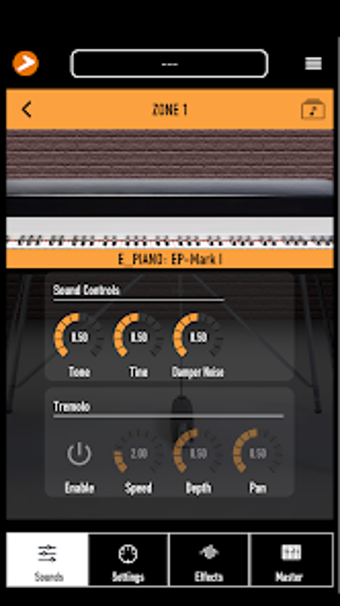
Numa Player, from Studiologic, is a professional virtual instrument that turns Android devices into portable musical workstations. It operates as a standalone sound engine or as a MIDI-controlled module, built for live performance, practice sessions, and mobile production workflows, with support for program and control changes. The app offers four multi-timbral zones, curated Acoustic and Electric Piano and Organ libraries, an effects rack plus master EQ and compressor, USB MIDI support, and MIDI mapping. Designed for keyboardists, live performers, and mobile producers who need high-quality onboard sounds on a device.
Unlock your creativity with Adobe Stock
Get 10 images or 1 video with a free trial
Keyboard-maker pedigree gives the samples context
The developer traces its experience to Fatar, a company known for keyboard actions used across the industry, and Numa's libraries are drawn from that hardware lineage. That connection explains why reviewers single out the piano and organ tones; the samples reflect a manufacturing heritage rather than generic stock patches. For players who value instrument realism, the source of the sounds is a deliberate design choice rather than a marketing claim.
Cross-platform presence supports desktop workflows too
Numa is not limited to mobile: the same sound engine and interface exist across Android, iOS, macOS, and Windows, so projects can move between device and desktop. On desktop systems the engine appears as VST3, AU, and AAX plugin formats, making it usable inside a DAW. That placement lets producers build patches on a computer and then take the same tones to a stage setup.
Performance and responsiveness depend on device capabilities
The app is optimized for low-latency performance on compatible Android hardware, but real-world responsiveness varies with each device. User reports highlight excellent sample quality, while also noting that playback smoothness and input latency are tied to the host device and its USB-MIDI and audio stack. Expect the best results on hardware with explicit low-latency audio support.
Who it suits and how it fits a musician’s workflow
Numa targets keyboard players, live performers, and mobile producers who want a compact sound source rather than a full DAW. The interface focuses on fast patch selection and live use, while the app’s mapping and control features let experienced users integrate it into larger rigs. Students and hobbyists gain access to professionally voiced instruments without carrying dedicated sound modules.
A practical pick for performers who accept mobile trade-offs
Numa is a practical option for keyboard players who need a compact, high-quality sound source on a device. Expect a trade-off: its behavior depends on the Android host and its audio/MIDI support, so deployment requires checking device compatibility. For musicians comfortable managing mobile audio setups, Numa provides a focused, portable engine that supports both stage use and desktop-based production workflows.
Pros
Samples derived from keyboard hardware deliver realistic piano and organ tones
Same sound engine and interface across Android, iOS, macOS, and Windows
Desktop builds provide VST3/AU/AAX plugin formats for DAW integration
Optimized for low-latency performance on compatible Android hardware
Cons
Playback and latency vary with specific Android hardware
Plugin formats apply to desktop, not the Android app
Advanced MIDI mapping requires familiarity with MIDI workflows
Laws concerning the use of this software vary from country to country. We do not encourage or condone the use of this program if it is in violation of these laws. Softonic may receive a referral fee if you click or buy any of the products featured here.